
Kea and DHCP Options
(Custom- and Vendor-Options)
Carsten Strotmann and the ISC Team
Created: 2023-03-30 Thu 19:38
All content © 2023 Internet Systems Consortium, Inc.

Welcome
Welcome to our Webinar on DHCP Options with Kea DHCP (with focus on vendor specific DHCP options)
All content © 2023 Internet Systems Consortium, Inc.
In this Webinar
- DHCP Options
- Defining custom options
- Vendor specific options
- Testing and Troubleshooting options
- Converting vendor options from ISC-DHCP to Kea DHCP
- Hands-On Workshop
All content © 2023 Internet Systems Consortium, Inc.
DHCP Options
All content © 2023 Internet Systems Consortium, Inc.
DHCP Options
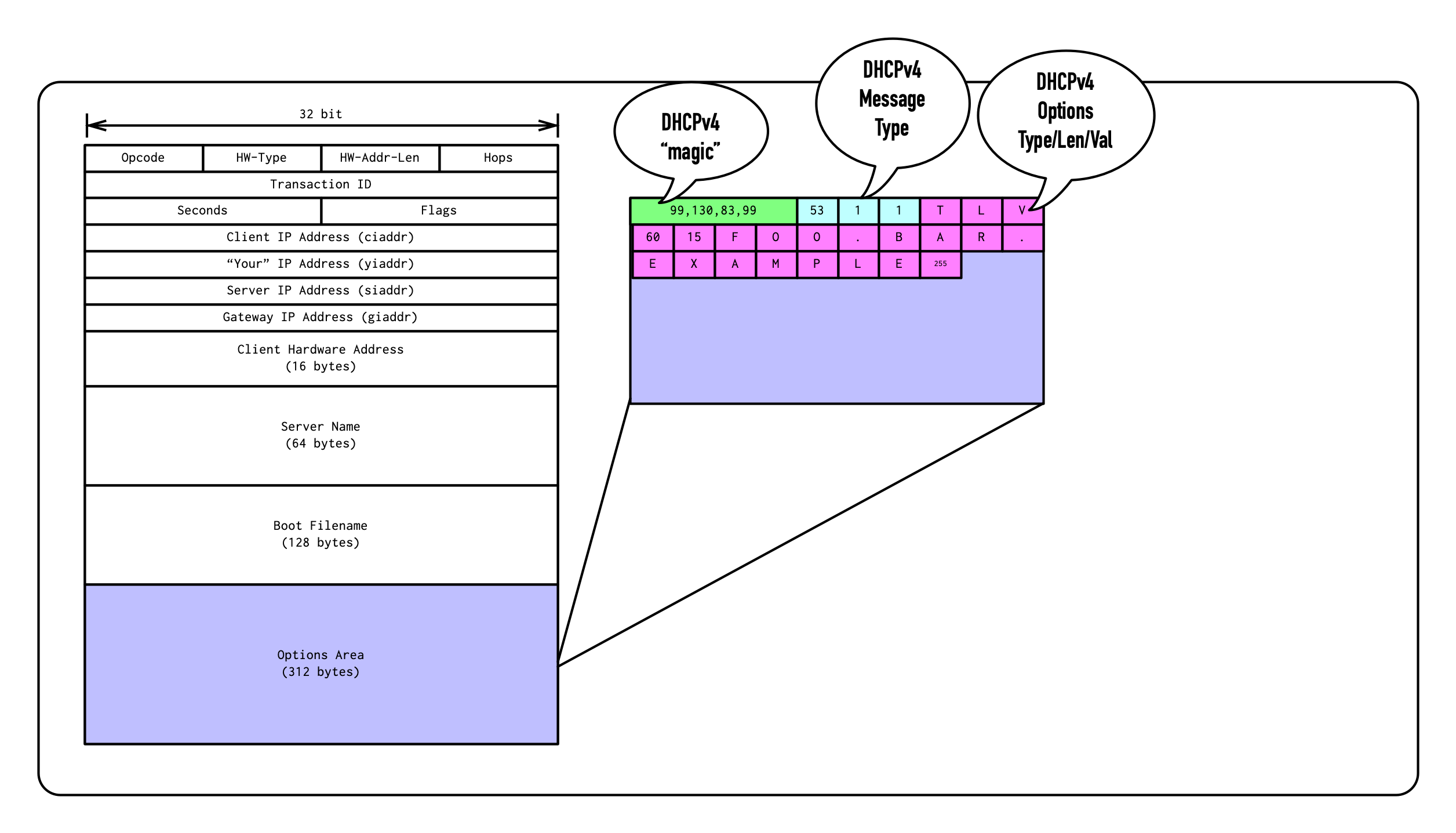
- The precursor of DHCP, BOOTP, had only fixed fields that communicated network configuration to the client
- DHCP has been designed to be extensible through DHCP options
- In DHCPv4, DHCP Options are located in the Options-Area of the DHCPv4 packet
All content © 2023 Internet Systems Consortium, Inc.
DHCP Options
- DHCP options has been retrofitted into the BOOTP packet format into a field that was known as the BOOTP vendor extensions, which is not the DHCPv4 Vendor Specific Information option.
All content © 2023 Internet Systems Consortium, Inc.
DHCP Options
- All DHCPv4 Options are identified by a 8bit value (the tag), giving us up to 255 different standard DHCPv4 options
- With the exception of DHCPv4 option
0and255, DHCP options are of variable size and have 3 fields- Tag (Option Number)
- Length (1 Byte, 0-255)
- Value (0-255 Bytes)
- Option
0is the padding option to align the bytes in an DHCPv4 packet to word boundaries - Option
255is the end marker option
All content © 2023 Internet Systems Consortium, Inc.
DHCP Packet
All content © 2023 Internet Systems Consortium, Inc.
DHCPv6 Options and Packet format
- The DHCPv6 packet format is not based on BOOTP or DHCPv4
- DHCPv6 options are using TLV (Type, Length, Value) format similar to DHCPv4
- Type and Length are 16bit, for larger option space and variable length value data
All content © 2023 Internet Systems Consortium, Inc.
DHCPv6 packet

All content © 2023 Internet Systems Consortium, Inc.
DHCPv4/v6 Options Registry and RFCs
- The DHCPv4 original options are defined in RFC 2132 https://www.rfc-editor.org/rfc/rfc2132.html
- The DHCPv6 options are defined in RFC 8415 https://www.rfc-editor.org/rfc/rfc8415.html
- The Internet Assigned Numbers Authority (IANA) publishes lists of all standard DHCPv4 and DHCPv6 options:
All content © 2023 Internet Systems Consortium, Inc.
DHCP Options in Kea DHCP
All content © 2023 Internet Systems Consortium, Inc.
DHCP options scope
- DHCP options can be configured in different scopes in the Kea
configuration
- Global
- Class
- Subnet
- Pools
- Reservations
All content © 2023 Internet Systems Consortium, Inc.
Global DHCP options (1/2)
"Dhcp4": {
    "option-data": [{
	   "name": "domain-name-servers",
	   "code": 6,
	   "space": "dhcp4",
	   "csv-format": true,
	   "data": "192.0.2.1, 192.0.2.2"
	},
	...
    ]}
All content © 2023 Internet Systems Consortium, Inc.
Global DHCP options (2/2)
- If the default values are used, the fields
code,spaceandcsv-formatcan be omitted
"Dhcp4": {
    "option-data": [{
           "name": "domain-name-servers",
           "data": "192.0.2.1, 192.0.2.2"
        },
        ...
    ]}
All content © 2023 Internet Systems Consortium, Inc.
Subnet specific DHCP option
[...]
   "subnet4": [ {
            "subnet": "192.0.2.0/24",
            "pools": [ { "pool": "192.0.2.100 - 192.0.2.200" } ],
            "option-data": [{
                    "name": "routers",
                    "data": "192.0.2.1" },
                {
                    "name": "domain-name",
                    "data": "a.example.com" }
            ]},
[...]
All content © 2023 Internet Systems Consortium, Inc.
Defining custom DHCPv4 options (1/2)
- Sometimes it is required to define custom DHCP options that are not
part of the DHCP standards.
- These can be vendor specific options, or new DHCP options that are not yet implemented in Kea DHCP
- Option codes 224 to 254 (decimal) had been reserved for private (site specific) options (31 possible options, see RFC 3942)
- Private options are not vendor options
All content © 2023 Internet Systems Consortium, Inc.
Defining custom DHCPv4 options (2/2)
{
    "Dhcp4": {
        "option-def": [{
                "name": "my-message",
                "code": 234,
                "type": "string",
                "array": false,
                "record-types": "",
                "space": "dhcp4",
                "encapsulate": "" }],
        "option-data": [{
                "name": "my-message",
                "space": "dhcp4",
                "csv-format": true,
                "data": "Hello World" }],
[...]
All content © 2023 Internet Systems Consortium, Inc.
Option assignment order
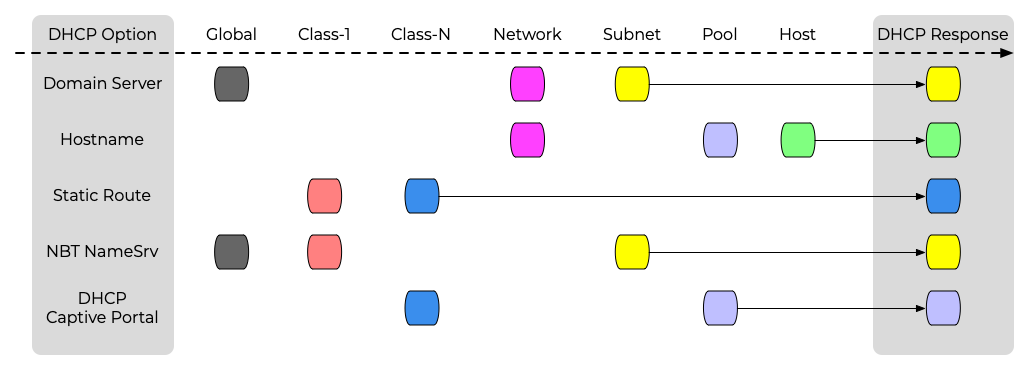
(Client-class options are assigned in the order in which the client classes are evaluated (specified in the configuration) )
All content © 2023 Internet Systems Consortium, Inc.
Vendor specific options
All content © 2023 Internet Systems Consortium, Inc.
Vendor specific options
- The DHCPv4 standard option space allows for 255 DHCP options
- Most of this option space is already assigned
- Getting a DHCP option code assigned is a long and relative complex process
- Vendors can use vendor specific options to configure device settings
All content © 2023 Internet Systems Consortium, Inc.
Vendor specific options
- DHCPv4 Option 43 and DHCPv6 option 17 can deliver one or more
vendor specific options
- Inside the vendor specific option data, a vendor can define up to 255 vendor specific DHCP options
All content © 2023 Internet Systems Consortium, Inc.
Vendor Specific options
- Inside the option 43 data, the vendor specific options are stored the same way (Tag/Length/Value) as regular DHCP options
All content © 2023 Internet Systems Consortium, Inc.
Vendor Specific options

All content © 2023 Internet Systems Consortium, Inc.
Defining Vendor Specific options in Kea DHCP
- Vendor specific options are defined in the same way as custom
(private) DHCP options
- An option definition tells Kea DHCP the structure of the option data
- List of data types supported by Kea DHCP https://kea.readthedocs.io/en/latest/arm/dhcp4-srv.html#dhcp-types
"Dhcp4": {
    "option-def": [
        {
            "name": "vendor-option01",
            "code": 1,
            "space": "vendor-encapsulated-options-space",
            "type": "string",
            "array": false,
            "record-types": "",
            "encapsulate": ""
        }
    ],
    ...
}
All content © 2023 Internet Systems Consortium, Inc.
Using Vendor Specific Options in Kea DHCP
- Once the option is defined, it can be used in any of the DHCP option scopes (global, shared-network, subnet, pool, reservation)
- The example below sets the data for a global option
"Dhcp4": {
    "option-data": [
        {
            "name": "vendor-option01",
            "space": "vendor-encapsulated-options-space",
            "code": 1,
            "csv-format": true,
            "data": "Hello World"
        }
    ],
    ...
}
All content © 2023 Internet Systems Consortium, Inc.
DHCP Vendor Class Identifier option
All content © 2023 Internet Systems Consortium, Inc.
Identifying clients
- With DHCPv4 option 43, there is only one vendor specific option
- How does a DHCPv4 server know which vendor specific option to send to a client machine?
- There is the DHCP vendor class identifier option (DHCPv4 Option 60) that is send by the client DHCPv4 stack
- The DHCP vendor class identifier option contains an opaque string that identifies the client
- The DHCPv4 server can select the vendor specific option data based on the content of option 60 send by the client
All content © 2023 Internet Systems Consortium, Inc.
Kea DHCP client classing
- This Kea DHCP configuration snippet selects a DHCP option based on
the
vendor-class-identifierDHCP option send by the client
"client-classes": [{
        "name": "Foo-Bar-Device",
        "test": "option[vendor-class-identifier].text == 'foo.bar.example'",
        "option-data": [ {
                "name": "log-servers",
                "data": "192.0.2.42"
            }]
    }],
[...]
All content © 2023 Internet Systems Consortium, Inc.
Vendor-independent vendor-specific information option (vivso)
All content © 2023 Internet Systems Consortium, Inc.
Vendor-independent vendor-specific information option
- Modern devices might contain components from multiple vendors
- Each component might need to get configuration through DHCP
- But there is only one DHCP option 43 - how to address multiple components/vendors in one device?
All content © 2023 Internet Systems Consortium, Inc.
Solution for DHCPv6
- The vendor specific option for DHCPv6 contains a 32bit enterprise-number to assign each vendor option to an vendor through its enterprise number (see RFC 8415 - 21.17. Vendor-specific Information Option https://www.rfc-editor.org/rfc/rfc8415.html#section-21.17)
- Enterprise Numbers are maintained by IANA https://www.iana.org/assignments/enterprise-numbers/
All content © 2023 Internet Systems Consortium, Inc.
Vendor-independent vendor-specific information option
- Enterprise numbers cannot be used inside DHCPv4 Option 43, as existing clients will not be able to parse the new format
- RFC 3925 specifies the Vendor-independent vendor-specific
information option (vivso) in DHCPv4 option 125
- It works similar to option 43, but with the extra enterprise number added to each encapsulated sub-option
- The companion option 124 "Vendor-Identifying Vendor Class" works like option 60 but with multiple vendor-class identifier identified by their enterprise number
All content © 2023 Internet Systems Consortium, Inc.
VIVSO and Kea DHCP
- Support for multiple enterprise IDs in VIVSO option have just been
implemented in Kea DHCPv4 (and released yesterday, Changelog #2107)
- See Ticket 1518 https://gitlab.isc.org/isc-projects/kea/-/issues/1518
- Support for multiple DHCPv6 vendor-options (code 17 options) has been implemented in Kea DHCP 2.3.6
All content © 2023 Internet Systems Consortium, Inc.
Testing and Troubleshooting options
All content © 2023 Internet Systems Consortium, Inc.
Sending the vendor-class-identifier
- The ISC-DHCP client (part of most Linux/Unix installations) can be
used to send the
vendor-class-identifieror the VIVSO option and can request the vendor specific options- The example below send a DHCPv4 request with the
vendor-class-identifierset tofoo.bar.example
- The example below send a DHCPv4 request with the
# dhclient -v -V foo.bar.example
All content © 2023 Internet Systems Consortium, Inc.
Printing of the received DHCP options
- With a minimal shell script that only contains the command
envto print the environment variables, the ISC-DHCP client will print all DHCP options received from the DHCP server - Shell script (in this example in
/usr/local/bin/dhcp-debug.sh)
#!/bin/sh
env
- Requesting a DHCP lease with custom options
# dhclient -v -V foo.bar.example -sf /usr/local/bin/dhcp-debug.sh
All content © 2023 Internet Systems Consortium, Inc.
Requesting Vendor Options from ISC DHCLIENT
dhclientdoes not request thevendor-encapsulated-optionsby default- create a configuration file
/etc/dhclient.confwith the linerequest vendor-encapsulated-options;to have dhclient request these options:
- create a configuration file
# cat /etc/dhclient.conf
also request vendor-encapsulated-options;
All content © 2023 Internet Systems Consortium, Inc.
Example output
# dhclient -v -V ciscopnp -sf dhclient-debug.sh client-eth0 -cf /etc/dhclient.conf | grep new
Internet Systems Consortium DHCP Client 4.4.3
Copyright 2004-2022 Internet Systems Consortium.
All rights reserved.
For info, please visit https://www.isc.org/software/dhcp/

Listening on LPF/client-eth0/4e:20:31:9e:50:31
Sending on   LPF/client-eth0/4e:20:31:9e:50:31
Sending on   Socket/fallback
DHCPDISCOVER on client-eth0 to 255.255.255.255 port 67 interval 6 (xid=0xc14f112c)
DHCPOFFER of 192.0.2.100 from 192.0.2.1
DHCPREQUEST for 192.0.2.100 on client-eth0 to 255.255.255.255 port 67 (xid=0xc14f112c)
DHCPACK of 192.0.2.100 from 192.0.2.1 (xid=0xc14f112c)
new_network_number=192.0.2.0
new_routers=192.0.2.1
new_dhcp_server_identifier=100.64.0.1
new_vendor_encapsulated_options=1:1a:35:41:31:44:3b:4b:34:3b:42:32:3b:49:31:39:32:2e:31:36:38:2e:31:30:30:2e:31:30
new_dhcp_lease_time=3600
new_dhcp_message_type=5
new_expiry=1680020260
new_broadcast_address=192.0.2.255
new_dhcp_rebinding_time=1800
new_ip_address=192.0.2.100
new_dhcp_renewal_time=900
new_next_server=0.0.0.0
old_dhcp_renewal_time=900
new_subnet_mask=255.255.255.0
bound to 192.0.2.100 -- renewal in 887 seconds.
All content © 2023 Internet Systems Consortium, Inc.
Other Testing/Troubleshooting options
tcpdumporwireshark
tcpdump -v -i eth0 port 67 and port 68
[...]
15:21:05.358570 IP (tos 0x10, ttl 128, id 0, offset 0, flags [none], proto UDP (17), length 338)
    474ede70076e.bootps > 192.0.2.100.bootpc: BOOTP/DHCP, Reply, length 310, hops 1, xid 0x5be18f2f, Flags [none]
          Your-IP 192.0.2.100
          Gateway-IP 474ede70076e
          Client-Ethernet-Address 4e:20:31:9e:50:31 (oui Unknown)
          Vendor-rfc1048 Extensions
            Magic Cookie 0x63825363
            DHCP-Message (53), length 1: ACK
            Subnet-Mask (1), length 4: 255.255.255.0
            Default-Gateway (3), length 4: 474ede70076e
            Vendor-Option (43), length 28: 1.26.53.65.49.68.59.75.52.59.66.50.59.73.49.57.50.46.49.54.56.46.49.48.48.46.49.48
            Lease-Time (51), length 4: 3600
            Server-ID (54), length 4: 100.64.0.1
            RN (58), length 4: 900
            RB (59), length 4: 1800
All content © 2023 Internet Systems Consortium, Inc.
DHCPtest
- DHCPtest is another DHCP test tool
- Written in the computer language
D - Source: https://github.com/CyberShadow/dhcptest
- Written in the computer language
% ./dhcptest --query
dhcptest v0.7 - Created by Vladimir Panteleev
https://github.com/CyberShadow/dhcptest
Run with --help for a list of command-line options.

Listening for DHCP replies on port 68.
Sending packet:
  op=BOOTREQUEST chaddr=2E:78:71:CA:DA:26 hops=0 xid=8DDD0A71 secs=0 flags=8000
  ciaddr=0.0.0.0 yiaddr=0.0.0.0 siaddr=0.0.0.0 giaddr=0.0.0.0 sname= file=
  1 options:
     53 (DHCP Message Type): discover
Received packet from 192.0.2.8:67:
  op=BOOTREPLY chaddr=2E:78:71:CA:DA:26 hops=0 xid=8DDD0A71 secs=0 flags=8000
  ciaddr=0.0.0.0 yiaddr=192.0.2.115 siaddr=0.0.0.0 giaddr=0.0.0.0 sname= file=
  9 options:
     53 (DHCP Message Type): offer
      1 (Subnet Mask): 255.255.255.0
      3 (Router Option): 192.0.2.1
      6 (Domain Name Server Option): 192.0.2.8, 172.16.1.105
     15 (Domain Name): home.example.com
     51 (IP Address Lease Time): 14400 (4 hours)
     54 (Server Identifier): 192.0.2.8
     58 (Renewal (T1) Time Value): 3600 (1 hour)
     59 (Rebinding (T2) Time Value): 7200 (2 hours)
All content © 2023 Internet Systems Consortium, Inc.
Converting custom options from ISC-DHCP to Kea DHCP
All content © 2023 Internet Systems Consortium, Inc.
Example 1 - Cisco PNP Option for ISC-DHCP
- ISC DHCP configuration
option space CISCOPNP;
option CISCOPNP.pnpserver code 43 = string;

class "ciscopnp" {
 match if option vendor-class-identifier = "ciscopnp";
 option vendor-class-identifier "ciscopnp";
 vendor-option-space CISCOPNP;
 option CISCOPNP.pnpserver = "5A1D;K4;B2;I192.168.100.10";
}

subnet 192.168.100.0 netmask 255.255.255.0 {
 range 192.168.100.24 192.168.100.63;
 option domain-name "example.org";
 default-lease-time 600;
 max-lease-time 7200;
}
All content © 2023 Internet Systems Consortium, Inc.
Example 1 - Cisco PNP Option for Kea DHCPv4
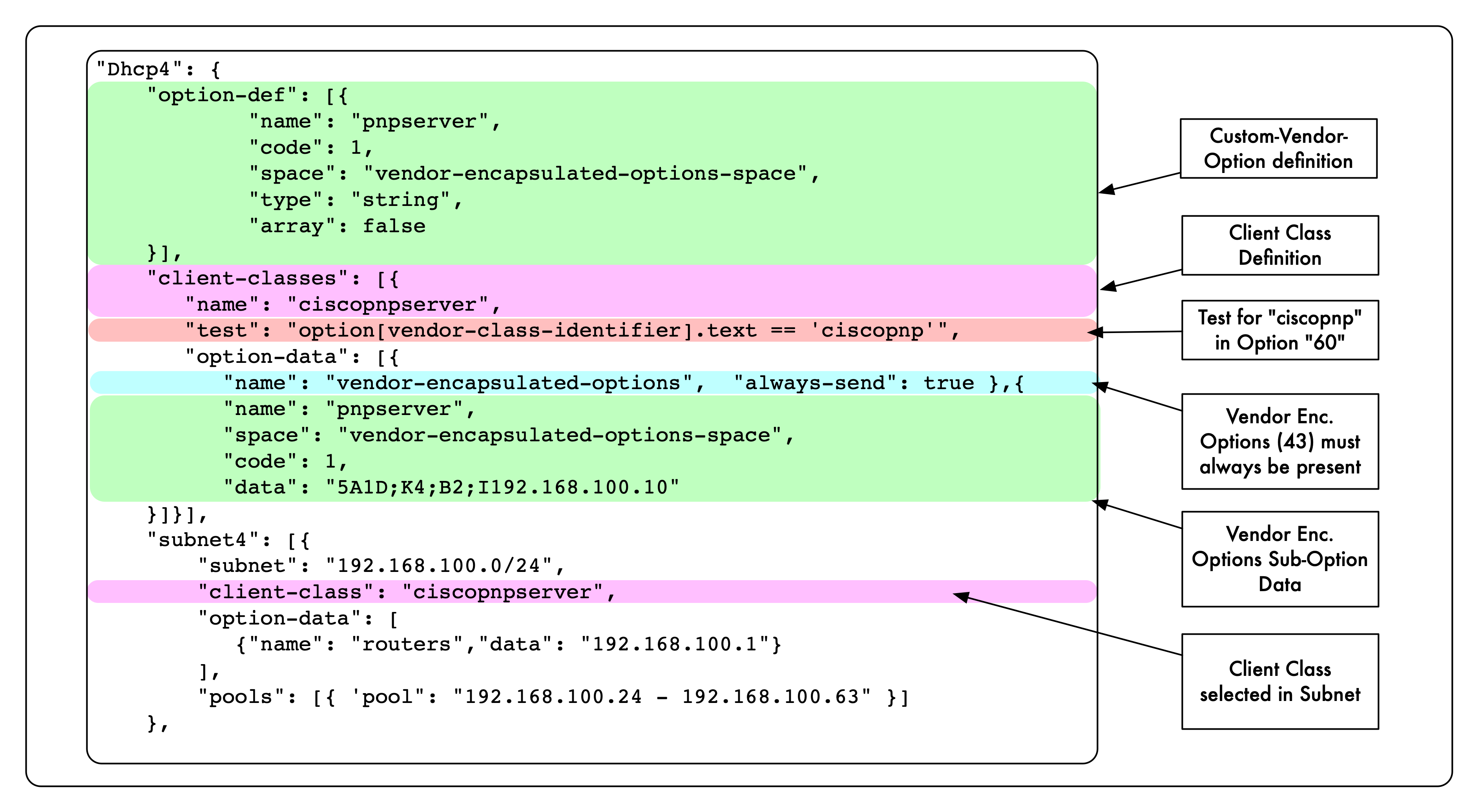
"Dhcp4": {
    "option-def": [{
            "name": "pnpserver",
            "code": 43,  # Option code /inside/ option 43
            "space": "vendor-encapsulated-options-space",
            "type": "string",
            "array": false
    }],
    "client-classes": [{
       "name": "ciscopnpserver",
       "test": "option[vendor-class-identifier].text == 'ciscopnp'",
       "option-data": [{
          "name": "vendor-encapsulated-options",  "always-send": true },{
          "name": "pnpserver",
          "space": "vendor-encapsulated-options-space",
	  "code": 43, # Option code /inside/ option 43
          "data": "5A1D;K4;B2;I192.168.100.10"
    }]}],
    "subnet4": [{
        "subnet": "192.168.100.0/24",
        "client-class": "ciscopnpserver",
        "option-data": [
           {"name": "routers","data": "192.168.100.1"}
        ],
        "pools": [{ 'pool": "192.168.100.24 - 192.168.100.63" }]
    },
All content © 2023 Internet Systems Consortium, Inc.
Vendor Option Definition explained
All content © 2023 Internet Systems Consortium, Inc.
Example 2 - PXE Boot Parameter
All content © 2023 Internet Systems Consortium, Inc.
Example 2 - Vendor Option Definitions
{
"Dhcp4": {
    "option-def": [{
            "name": "discovery-control",
            "code": 6,
            "space": "vendor-encapsulated-options-space",
            "type": "uint8",
            "array": false
    },{
            "name": "boot-server",
            "code": 8,
            "type": "record",
            "record-types": "uint16, uint8, ipv4-address",
            "space": "vendor-encapsulated-options-space",
            "array": false
    },{
            "name": "boot-menu",
            "code": 9,
            "type": "record",
            "record-types": "uint16, uint8, string",
            "space": "vendor-encapsulated-options-space",
            "array": false
    },{
            "name": "menu-prompt",
            "code": 10,
            "type": "record",
            "record-types": "uint8, string",
            "space": "vendor-encapsulated-options-space",
            "array": false
    }],
    [...]
All content © 2023 Internet Systems Consortium, Inc.
Example 2 - Client Class
[...]
"client-classes": [{
   "name": "pxeclient",
   "test": "option[60].text == 'PXEClient'",
   "option-data": [
      { "name": "vendor-encapsulated-options",  "always-send": false },
      { "name": "discovery-control", "space": "vendor-encapsulated-options-space", "data": "7" },
      { "name": "boot-menu",         "space": "vendor-encapsulated-options-space", "data": "15,5,REMBO" },
      { "name": "menu-prompt",       "space": "vendor-encapsulated-options-space", "data": "0,REMBO" }
]}],
[...]
All content © 2023 Internet Systems Consortium, Inc.
Example 2 - Subnet
[...]
"subnet4": [
    {
        "subnet": "192.0.2.0/24",
        "client-class": "pxeclient",
        "pools": [ { "pool": "192.0.2.100 - 192.0.2.200" } ],
        "option-data": [
            { "name": "routers", "data": "192.0.2.1" }
        ]
    }
],
[...]
All content © 2023 Internet Systems Consortium, Inc.
Device incompatibilities
- Sometimes vendors have implemented the DHCP client code in their
devices not based on the DHCP RFC standards, but on the observed
communication with existing DHCP server
- Kea DHCP might differ from other DHCP server, but still comply to the RFC DHCP standards (order of options send, use of padding options etc)
- Sometimes it is necessary to dive deeper into the DHCP packets
with
tcpdumpor Wireshark and compare the actual DHCP requests and responses send - As a last resort, ISC-DHCP behavior needs to emulated by specifying the vendor option date in binary/hexadecimal format
"csv-format": false,
"data": "C0 00 03 01 C0 00 03 02"
All content © 2023 Internet Systems Consortium, Inc.
Upcoming ISC Webinar
- 20 Apr - Netbox and Kea DHCP
- 16 May - Migrating to Kea from ISC DHCP
- 07 Jun - Using the new dynamic templates in Kea
All content © 2023 Internet Systems Consortium, Inc.
Questions / Answers
All content © 2023 Internet Systems Consortium, Inc.
Hands-On:
- Kea DHCP and Vendor Specific Options https://webinar.defaultroutes.de/webinar/15-kea-options-workshop.html
All content © 2023 Internet Systems Consortium, Inc.